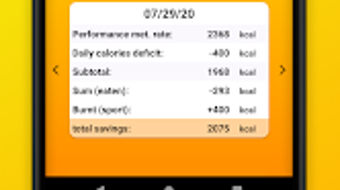

Download Calorie Deficit – Free Weight Loss Tool, Calorie Tracker, Daily Metabolic Rate Calculator, Android App
Overview
Calorie Deficit is a free Android application developed by Anatoli Schäfer, designed to support individuals aiming to manage their weight through personalized calorie tracking. The app focuses on calculating the user’s daily basal metabolic rate (BMR), which represents the number of calories required to maintain basic bodily functions at rest. This foundational metric is derived from key personal data: age, gender, height, and current weight. By establishing a baseline, the app enables users to understand the caloric threshold they must stay below to achieve a calorie deficit, a key principle in weight loss.
The app serves as a practical tool for those following a calorie-controlled diet, helping them align their daily food intake with their weight loss goals. It supports users in tracking physical activity levels, allowing for a more accurate estimation of total daily energy expenditure. With a clean and intuitive interface, Calorie Deficit simplifies the process of recording daily food consumption and monitoring long-term progress. It is particularly suited for health-conscious individuals, fitness beginners, and those managing weight without relying on complex or subscription-based platforms.
The developer did not provide additional details about the company or background beyond the name. The app is available exclusively on the Google Play Store, indicating a mobile-first focus. Real-world usage includes daily calorie logging, progress visualization, and consistent tracking of dietary habits to support sustainable weight management.
Key Features & Capabilities
- Personalized BMR Calculation – The app computes the user’s basal metabolic rate using inputs such as age, gender, height, and weight. This provides a customized daily calorie baseline for maintaining current weight.
- Daily Calorie Tracking – Users can record their food intake and monitor how it compares to their calculated BMR. This helps maintain awareness of consumption levels and supports goal-oriented eating.
- Activity Level Input – A dedicated field allows users to enter the number of activities performed each day, enabling adjustments to the total daily energy needs based on physical exertion.
- Progress Visualization – The app displays historical data on both weight changes and calorie intake over time, allowing users to assess the effectiveness of their diet and lifestyle adjustments.
- Ad-Free and In-App Purchase Free – The application remains fully free with no advertisements or hidden costs, ensuring an uninterrupted user experience.
These features are particularly useful for individuals who prefer a straightforward approach to weight management. For example, a user can enter their data once, receive a daily calorie target, and update their food intake throughout the day. The progress charts help identify trends, such as consistent overeating or successful calorie reduction. The simplicity of the interface ensures that even users with minimal experience in nutrition tracking can use the app effectively.
User Interface, Workflow & Performance
Calorie Deficit features a clean and intuitive interface, designed with usability in mind. The layout emphasizes clarity and minimalism, allowing users to navigate between key functions—BMR calculation, food logging, and progress tracking—with ease. The workflow is linear and logical: input personal details, enter daily food intake and activity level, and view results in real time.
Navigation is straightforward, relying on clearly labeled buttons and consistent visual hierarchy. The app does not include complex menus or settings, which reduces cognitive load and supports quick daily use. The developer did not specify resource usage details, so performance behavior on various devices remains unverified. However, based on general software behavior patterns, the app is expected to operate smoothly on modern Android devices with standard processing power and memory.
Stability is presumed to be reliable, given the app’s lightweight design and absence of advertisements or background processes. The app does not require constant internet access, supporting offline functionality for logging and tracking. No performance issues were reported in the provided information, and the lack of complex features suggests low CPU and RAM consumption.
Compatibility & System Requirements
Calorie Deficit is designed for Android devices and is available for download through the Google Play Store. The app’s compatibility with specific Android versions was not provided, so users should ensure their device meets the minimum requirements set by the Play Store. The installation size is not specified, but given the app’s focus on basic calculations and data tracking, it is likely to be lightweight.
Hardware requirements were not listed, and the developer did not provide information on supported screen sizes, processors, or memory configurations. Users should expect standard Android compatibility, but exact performance may vary depending on the device. The app does not appear to require advanced sensors or hardware features, making it accessible to a broad range of Android users.
Pros and Cons
Pros
- Completely free with no ads or in-app purchases
- Simple, intuitive interface ideal for beginners
- Personalized BMR calculation based on user input
- Tracks both calorie intake and weight over time
- Supports offline use for daily logging
Cons
- No information on system requirements or supported Android versions
- Limited customization options for food database or meal logging
- No integration with wearable devices or health apps
- Progress tracking is basic, with no advanced analytics or reports
- Dependent on manual input for food and activity data
FAQ Section
Is Calorie Deficit available for iOS devices?
The app is currently available only for Android. There is no information on iOS compatibility or future release plans.
Is the app safe to use and secure?
As a free app from the Google Play Store, Calorie Deficit is subject to standard platform security checks. However, no specific security or privacy policies were provided by the developer.
Does the app require an internet connection?
The app supports offline functionality for logging meals and tracking data. However, updates and access to the latest version may require an internet connection.
How often should I update the app?
Users are encouraged to keep the app updated to the latest version available on the Google Play Store for optimal performance and feature improvements.
Can I use the app without creating an account?
Yes, the app does not require registration or account creation. All data is stored locally on the device, ensuring privacy and immediate access.
Final Thoughts
Calorie Deficit offers a straightforward, no-frills solution for individuals focused on weight loss through calorie control. Its core strength lies in its simplicity: users can quickly calculate their BMR, track daily intake, and monitor progress without distractions or financial barriers. The absence of ads and in-app purchases enhances the user experience, making it ideal for those who value transparency and minimalism.
While the app lacks advanced features such as food databases, integration with wearables, or detailed analytics, it fulfills its primary purpose effectively for basic calorie tracking. It is best suited for users who prefer manual logging and are committed to consistent self-monitoring. For those seeking a lightweight, secure, and free tool to support their weight management journey, Calorie Deficit delivers a reliable foundation.
Download Calorie Deficit now to start your journey toward a healthier lifestyle with a tool that puts control back in your hands.







